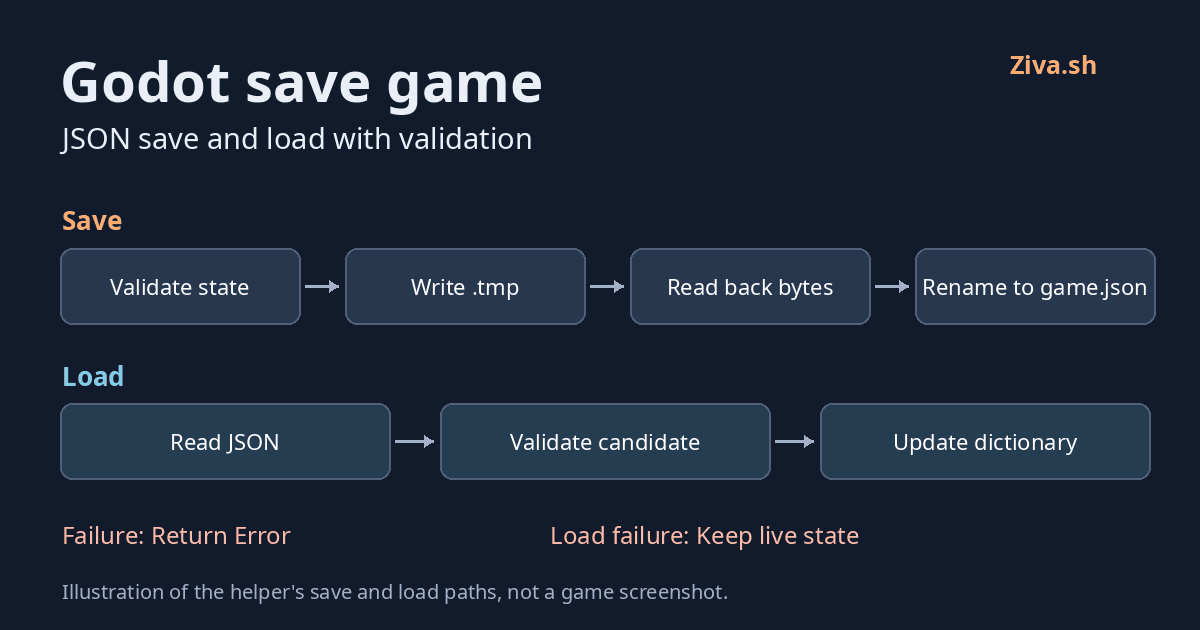
Godot save game: JSON save and load with validation
To save a game in Godot, choose the state you need, serialize it with JSON, and write it with FileAccess. Loading needs a second step after parsing: validate the data before replacing the state your game is using.
The helper below saves numeric health and a scalar 2D position to user://game.json. It returns an Error when a save or load fails, rather than silently substituting default state. It updates a mutable, untyped Dictionary, not your scene tree or player node.
Download the helper and its tests: https://ziva.sh/assets/examples/godot-save-game.zip
The example was tested with Godot 4.7.2 on Linux. The download has no main scene or playable interface. For requirements and the Linux test runner, see https://ziva.sh/docs/godot-save-game-example.
Choose the fields before writing the file
The test fixture creates this state:
func _state() -> Dictionary:
	return {"version": 1, "health": 75, "position": {"x": 12.5, "y": -8.25}}
This is a deliberately small format:
versionmust be numeric1. Numeric1.0is accepted; a string or boolean is not. Other versions are rejected, not migrated.healthmust be a finite whole number. Negative health is allowed: this is a serialization rule, not a gameplay clamp.positionmust contain exactly numericxandy. It is not a serializedVector2or a reference to a node.
The top-level object must contain exactly version, health and position. Missing or additional fields are errors. All numeric fields, including both coordinates, must have magnitude at most 9007199254740991.
That bound matters because Godot’s JSON parser reads numbers as floats. An integer-typed value can load as a float, and larger integers cannot be reliably preserved. The validation applies to the parsed values, not arbitrary decimal text before parsing. It does not make Godot’s parser a strict RFC JSON validator or promise exact preservation of every decimal spelling.
Godot documents those parsing limits here: https://docs.godotengine.org/en/stable/classes/class_json.html
The complete save/load helper
Put this unchanged file at your project root as save_load.gd. It does not need to be attached to a node.
extends RefCounted

const SAVE_PATH := "user://game.json"
const MAX_JSON_MAGNITUDE := 9007199254740991


static func _fail(error: Error, detail: String) -> Error:
	push_error("SaveLoad: %s (Error %d: %s)" % [detail, error, error_string(error)])
	return error


static func _json_number(value: Variant) -> bool:
	# JSON parses numbers as floats, so larger integers cannot be reliably preserved.
	return (value is int or value is float) and is_finite(float(value)) and value >= -MAX_JSON_MAGNITUDE and value <= MAX_JSON_MAGNITUDE


static func _validate(candidate: Variant) -> Error:
	if not candidate is Dictionary:
		return _fail(ERR_INVALID_DATA, "State must be an object")
	if candidate.size() != 3 or not candidate.has_all(["version", "health", "position"]):
		return _fail(ERR_INVALID_DATA, "State requires exactly version, health, position")
	if not _json_number(candidate.version) or candidate.version != 1:
		return _fail(ERR_INVALID_DATA, "Unsupported version: expected numeric 1")
	if not _json_number(candidate.health) or floor(float(candidate.health)) != candidate.health:
		return _fail(ERR_INVALID_DATA, "Health must be a finite whole JSON number with magnitude <= %d (exact-integer representation limit)" % MAX_JSON_MAGNITUDE)
	var position: Variant = candidate.position
	if not position is Dictionary or position.size() != 2 or not position.has_all(["x", "y"]):
		return _fail(ERR_INVALID_DATA, "Position requires exactly scalar x and y")
	if not _json_number(position.x) or not _json_number(position.y):
		return _fail(ERR_INVALID_DATA, "Position x and y must be finite JSON numbers with magnitude <= %d (exact-integer representation limit)" % MAX_JSON_MAGNITUDE)
	return OK


static func load_game(live_state: Dictionary, path: String = SAVE_PATH) -> Error:
	if live_state.is_read_only():
		return _fail(ERR_INVALID_PARAMETER, "Load destination must be mutable")
	if live_state.is_typed():
		return _fail(ERR_INVALID_PARAMETER, "Load destination must be an untyped Dictionary")
	var file := FileAccess.open(path, FileAccess.READ)
	if file == null:
		return _fail(FileAccess.get_open_error(), "Cannot open save for reading: %s" % path)
	var text := file.get_as_text()
	var read_error := file.get_error()
	file.close()
	if read_error != OK:
		return _fail(read_error, "Cannot read save: %s" % path)
	var json := JSON.new()
	var parse_error := json.parse(text)
	if parse_error != OK:
		return _fail(parse_error, "JSON at line %d: %s" % [json.get_error_line(), json.get_error_message()])
	var validation_error := _validate(json.data)
	if validation_error != OK:
		return validation_error
	live_state.clear()
	live_state.merge(json.data.duplicate(true))
	return OK


static func _discard_temp(path: String) -> void:
	var error := DirAccess.remove_absolute(ProjectSettings.globalize_path(path))
	if error != OK:
		_fail(error, "Cannot remove owned temporary file: %s" % path)


static func save_game(live_state: Dictionary, path: String = SAVE_PATH) -> Error:
	var validation_error := _validate(live_state)
	if validation_error != OK:
		return validation_error
	var temporary := path + ".tmp"
	# A foreign temporary path is not ours to overwrite or delete.
	if FileAccess.file_exists(temporary) or DirAccess.dir_exists_absolute(ProjectSettings.globalize_path(temporary)):
		return _fail(ERR_ALREADY_EXISTS, "Temporary path already exists: %s" % temporary)
	var file := FileAccess.open(temporary, FileAccess.WRITE)
	if file == null:
		return _fail(FileAccess.get_open_error(), "Cannot open temporary save for writing: %s" % temporary)
	var serialized := JSON.stringify(live_state, "\t", true, true)
	file.store_string(serialized)
	var write_error := file.get_error()
	file.flush()
	var flush_error := file.get_error()
	file.close()
	if write_error != OK or flush_error != OK:
		_discard_temp(temporary)
		return _fail(write_error if write_error != OK else flush_error, "Cannot write/flush temporary save: %s" % temporary)
	# Readback protects the last save from incomplete writes.
	file = FileAccess.open(temporary, FileAccess.READ)
	if file == null:
		var open_error := FileAccess.get_open_error()
		_discard_temp(temporary)
		return _fail(open_error, "Cannot reopen temporary save for verification: %s" % temporary)
	var written := file.get_buffer(file.get_length())
	var read_error := file.get_error()
	file.close()
	if read_error != OK or written != serialized.to_utf8_buffer():
		_discard_temp(temporary)
		return _fail(read_error if read_error != OK else ERR_FILE_CANT_WRITE, "Temporary save verification failed: %s" % temporary)
	var rename_error := DirAccess.rename_absolute(ProjectSettings.globalize_path(temporary), ProjectSettings.globalize_path(path))
	if rename_error != OK:
		_discard_temp(temporary)
		return _fail(rename_error, "Cannot rename temporary save to: %s" % path)
	return OK
Call it without hiding failures
The test script loads the helper with this line:
const SaveLoad = preload("res://save_load.gd")Pass your state Dictionary to SaveLoad.save_game(live) to save it, or SaveLoad.load_game(live) to replace its contents from the file. Both return an Error; compare the result with OK before reporting success. The optional path argument lets the caller choose a different destination. Its parent directory must already exist.
For loading, the destination must be mutable and untyped. A variable declared as Dictionary is fine; a typed dictionary such as Dictionary[String, Variant] is not. Read-only or typed load destinations return ERR_INVALID_PARAMETER before any file access or state mutation. This restriction concerns the load destination only: save input may be read-only if its contents pass validation.
Before saving, copy the fields your game needs into the Dictionary. After a successful load, apply the validated values to your own gameplay properties and nodes. If a property requires an integer, handle that conversion after validation rather than assuming JSON retained the original integer type. The helper does not restore a scene, spawn objects or move a character on its own.
On a failed load, leave the current game state in place and show or record the error. A missing save returns an error too. Whether that means offering a new game is a decision for your game, not a successful load invented by the helper.
Why loading validates before changing state
FileAccess.open() can fail before there is a file object to read. The helper checks for that, records the read status, then calls JSON.parse(). Parse errors include the parser’s line and message.
A successful parse only means Godot produced a value. That value could still be an array, an unsupported version, or an object with the wrong fields. _validate() checks the complete candidate before live_state.clear() and merge() run. A rejected candidate leaves the live Dictionary unchanged.
For the underlying file API, see https://docs.godotengine.org/en/stable/classes/class_fileaccess.html .
Write a temporary file, then verify it
The save path is staged rather than opening the existing destination for writing:
- Validate the state before opening any output file.
- Refuse an existing
.tmppath. The helper does not overwrite or delete a temporary file it did not create during this call. - Serialize once, write the temporary file, and check the write and flush status.
- Close and reopen it. Compare the bytes read back with the exact serialized UTF-8 bytes.
- Rename the verified temporary file to the destination. If an earlier step or the rename fails, report the error and attempt to remove the temporary file owned by this call. A cleanup failure is logged separately.
The readback check has a specific regression test: a Linux child process is limited to a 16-byte output file. In that test, the helper returns ERR_FILE_CANT_WRITE for the truncated temporary file, keeps the previous save and live state, and removes its temporary file.
That is a controlled truncated-write result, not proof against every disk-full condition, power loss or filesystem failure. Reading matching bytes back is not a durability guarantee. The helper assumes one writer and a trusted private save directory; it has no concurrent-writer coordination, adversarial-path protection or power-loss recovery protocol.
What the tests cover, and what they do not
The recorded Godot 4.7.2 Linux run passed 296 assertions: 284 in the main suite, seven in a separate persistence process, and five in the constrained-write process. These are assertions, not 296 independent tests or a performance benchmark.
The cases include saving, overwriting, loading after live state changes, reading in a new process, numeric boundaries, malformed input, missing files, unsupported versions, extra fields, read-only and typed load destinations, an existing temporary file, a failed rename and the constrained write. Rejection cases check the error and the state or file bytes that should remain unchanged.
The example is not encrypted, an anti-cheat system, a cloud save service or a complete save format for arbitrary objects. It does not migrate older formats or impose a file-size cap on reads. Other Godot versions and platforms need their own checks.
Run the supplied tests before adapting the helper, then add cases for the fields your game actually saves. The run guide explains the intentional error messages: https://ziva.sh/docs/godot-save-game-example
For a broader introduction to choosing persistent fields, see Godot’s saving tutorial: https://docs.godotengine.org/en/stable/tutorials/io/saving_games.html