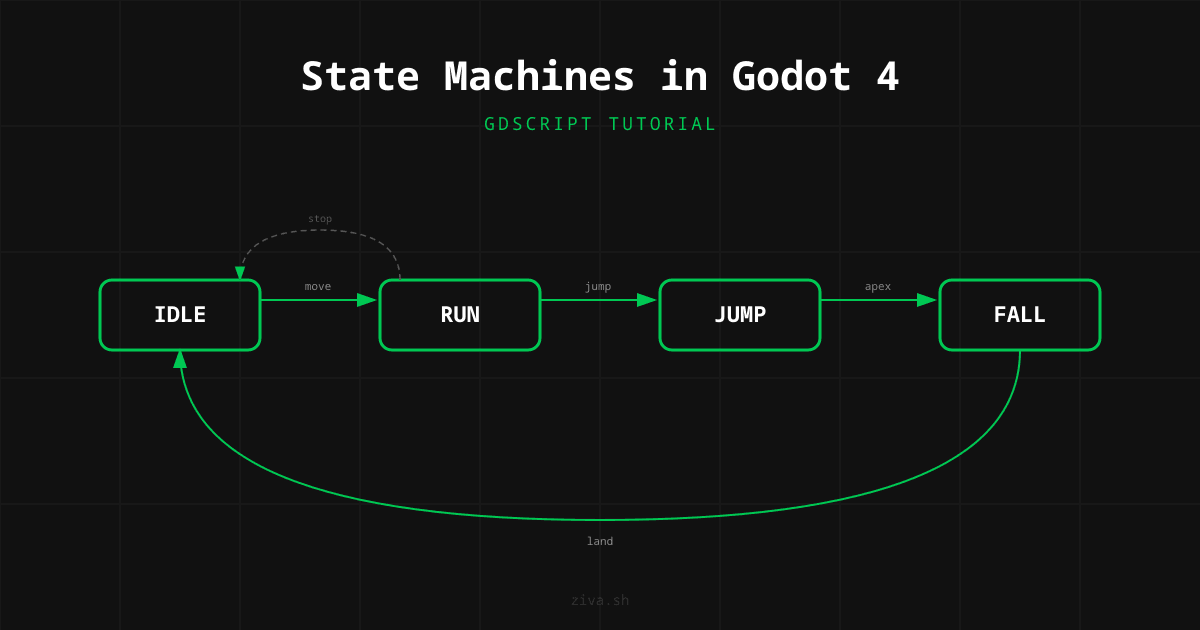
How to Build a State Machine in Godot 4
State machines replace nested if/else chains with clean, isolated states. Each state owns its own logic. Transitions between states are explicit. Your code becomes easier to read, debug, and extend.
Start with an enum + match statement for simple characters. It takes about 30 lines of GDScript and handles 4-6 states comfortably. When states start needing their own variables and timers, upgrade to the node-based pattern.
AnimationTree has a built-in state machine, but it is for animations, not game logic.
Use it to blend between animation clips. Use code-based state machines for player behavior, AI decisions, and game flow.
Every game character is already a state machine
Open any platformer codebase and look at the player controller. You will find something like this:
func _physics_process(delta):
    if is_on_floor():
        if Input.is_action_pressed("move_right") or Input.is_action_pressed("move_left"):
            # running logic
            if Input.is_action_just_pressed("jump"):
                # jump while running
        else:
            if Input.is_action_just_pressed("jump"):
                # jump while idle
            else:
                # idle logic
    else:
        if velocity.y < 0:
            # jumping logic
        else:
            # falling logic
This works for a prototype. Then you add wall sliding. Then you add dashing. Then you add attacking. Each new behavior doubles the nesting and the number of edge cases. You end up checking is_on_floor() in six different places and wondering why the jump animation sometimes plays during a dash.
A state machine fixes this by splitting each behavior into its own isolated block. The player is always in exactly one state. Each state defines what happens during that state and what causes a transition to another state. That is it.
The GDQuest team calls this “the most useful pattern in game development,” and they are not exaggerating. State machines show up in player controllers, enemy AI, menu systems, dialogue trees, and game-level flow (main menu, playing, paused, game over). Once you learn the pattern, you will use it everywhere.
Enum + match in 40 lines
For a character with a handful of states, you do not need a framework. An enum and a match statement are enough.
extends CharacterBody2D

enum State { IDLE, RUN, JUMP, FALL }
var current_state: State = State.IDLE

const SPEED := 200.0
const JUMP_VELOCITY := -350.0
const GRAVITY := 980.0

func _physics_process(delta: float) -> void:
    match current_state:
        State.IDLE:
            _state_idle(delta)
        State.RUN:
            _state_run(delta)
        State.JUMP:
            _state_jump(delta)
        State.FALL:
            _state_fall(delta)

    move_and_slide()

func _state_idle(_delta: float) -> void:
    velocity.x = move_toward(velocity.x, 0, SPEED)
    _apply_gravity(_delta)

    if not is_on_floor():
        _change_state(State.FALL)
    elif Input.is_action_just_pressed("jump"):
        velocity.y = JUMP_VELOCITY
        _change_state(State.JUMP)
    elif _get_input_direction() != 0.0:
        _change_state(State.RUN)

func _state_run(_delta: float) -> void:
    velocity.x = _get_input_direction() * SPEED
    _apply_gravity(_delta)

    if not is_on_floor():
        _change_state(State.FALL)
    elif Input.is_action_just_pressed("jump"):
        velocity.y = JUMP_VELOCITY
        _change_state(State.JUMP)
    elif _get_input_direction() == 0.0:
        _change_state(State.IDLE)

func _state_jump(_delta: float) -> void:
    velocity.x = _get_input_direction() * SPEED
    _apply_gravity(_delta)

    if velocity.y >= 0:
        _change_state(State.FALL)

func _state_fall(_delta: float) -> void:
    velocity.x = _get_input_direction() * SPEED
    _apply_gravity(_delta)

    if is_on_floor():
        if _get_input_direction() != 0.0:
            _change_state(State.RUN)
        else:
            _change_state(State.IDLE)

func _apply_gravity(delta: float) -> void:
    velocity.y += GRAVITY * delta

func _get_input_direction() -> float:
    return Input.get_axis("move_left", "move_right")

func _change_state(new_state: State) -> void:
    current_state = new_state
Every state is a separate function. You can read _state_jump without knowing anything about _state_idle. Adding a new state means adding one enum value, one match branch, and one function. Nothing else changes.
Notice the typed annotations on every variable and function. As we covered in our GDScript vs C# comparison, typed GDScript runs significantly faster than untyped GDScript in Godot 4, with up to 59% speedups on Vector2 operations.
When this approach works well: Characters with 3-6 states that do not need per-state variables or complex enter/exit logic.
When it starts to break down: When you need to track how long you have been in a state, run one-time setup when entering a state (play a specific animation, reset a timer), or clean up when leaving a state (stop particles, cancel a tween). You can bolt all of that onto the enum approach, but it gets messy fast.
Separate scripts per state
The node-based state machine pattern takes advantage of something Godot is already great at: nodes and the scene tree . Each state is a node with its own script. A parent “state machine” node manages which state is active.
Your scene tree looks like this:
Player (CharacterBody2D)
  StateMachine (Node)
    Idle (Node)
    Run (Node)
    Jump (Node)
    Fall (Node)
  CollisionShape2D
  AnimatedSprite2D
First, the base state script. Every state extends this.
# state.gd
class_name State
extends Node

# Called once when this state becomes active
func enter() -> void:
    pass

# Called once when this state is replaced by another
func exit() -> void:
    pass

# Called every physics frame while this state is active
func physics_update(delta: float) -> void:
    pass

# Called every frame while this state is active
func update(delta: float) -> void:
    pass
Next, the state machine that manages transitions.
# state_machine.gd
class_name StateMachine
extends Node

@export var initial_state: State

var current_state: State

func _ready() -> void:
    # Wait for the owner (Player) to be ready
    await owner.ready

    if initial_state == null:
        push_error("StateMachine has no initial state assigned.")
        return

    current_state = initial_state
    current_state.enter()

func _physics_process(delta: float) -> void:
    current_state.physics_update(delta)

func _process(delta: float) -> void:
    current_state.update(delta)

func transition_to(target_state_name: String) -> void:
    var target_state := get_node_or_null(target_state_name) as State
    if target_state == null:
        push_error("State '%s' not found." % target_state_name)
        return
    if target_state == current_state:
        return

    current_state.exit()
    current_state = target_state
    current_state.enter()
Now each state script is clean and self-contained.
# idle_state.gd
extends State

@onready var player: CharacterBody2D = owner
@onready var state_machine: StateMachine = get_parent()

func enter() -> void:
    player.get_node("AnimatedSprite2D").play("idle")

func physics_update(delta: float) -> void:
    player.velocity.x = move_toward(player.velocity.x, 0, player.SPEED)
    player.velocity.y += player.GRAVITY * delta
    player.move_and_slide()

    if not player.is_on_floor():
        state_machine.transition_to("Fall")
    elif Input.is_action_just_pressed("jump"):
        state_machine.transition_to("Jump")
    elif Input.get_axis("move_left", "move_right") != 0.0:
        state_machine.transition_to("Run")
# jump_state.gd
extends State
@onready var player: CharacterBody2D = owner
@onready var state_machine: StateMachine = get_parent()
func enter() -> void:
player.velocity.y = player.JUMP_VELOCITY
player.get_node("AnimatedSprite2D").play("jump")
func physics_update(delta: float) -> void:
player.velocity.x = Input.get_axis("move_left", "move_right") * player.SPEED
player.velocity.y += player.GRAVITY * delta
player.move_and_slide()
if player.velocity.y >= 0:
state_machine.transition_to("Fall")This is more code upfront, but each state file is small and independent. Adding a dash state means creating one new script and one new node. You never touch existing states. The GDQuest finite state machine tutorial popularized this exact pattern, and it is used in most serious Godot projects.
The enter() and exit() functions are the key advantage. When you transition to Jump, enter() sets the velocity and plays the animation. When you leave Jump, exit() can cancel any timers or effects. This is extremely hard to manage cleanly with the enum approach.
AnimationTree is for animations, not game logic
Godot’s AnimationTree has a built-in state machine node type. It is tempting to use it for all your state management. Do not do this.
AnimationTree state machines are designed for one thing: blending between animation clips. They handle crossfading a run animation into a jump animation, playing a transition animation between idle and attack, or blending upper body and lower body animations independently. They do this very well.
What they do not handle: game logic. You cannot put your movement code, your input handling, or your AI decision-making inside an AnimationTree node. The AnimationTree does not replace a code-based state machine. It complements one.
The right architecture for a polished character is both:
- A code-based state machine (enum or node-based) that owns all gameplay logic: input, physics, decisions
- An AnimationTree state machine that owns animation blending, driven by the code state machine
Your code state calls animation_tree.set("parameters/playback") to tell the AnimationTree which animation state to travel to. The AnimationTree handles the blend timing. This separation keeps animation concerns out of your gameplay code and vice versa.
# Inside a code-based state's enter() function
func enter() -> void:
    var playback: AnimationNodeStateMachinePlayback = player.animation_tree.get(
        "parameters/playback"
    )
    playback.travel("Run")
The Godot documentation on AnimationTree covers the setup in detail. Use it for what it is good at, and keep your game logic in GDScript.
Five mistakes that will cost you hours
1. Nested if/else instead of states. This is the problem state machines solve. If you find yourself writing if is_on_floor() and not is_dashing and not is_attacking and not is_wall_sliding, you need states.
2. Forgetting enter/exit transitions. The biggest advantage of a state machine over raw conditionals is that you get a clear moment when a state starts and stops. If you skip enter() and exit(), you lose that advantage. Always play animations in enter(). Always clean up timers and effects in exit().
3. Checking the wrong state’s conditions. A common bug: the fall state checks is_on_floor() and transitions to idle, but idle immediately checks not is_on_floor() and transitions back to fall. This causes a one-frame flicker. The fix is to make sure move_and_slide() runs before transition checks, so is_on_floor() reflects the current frame’s physics.
4. Making the state machine do too much. The state machine should route to states and handle transitions. It should not contain gameplay logic. If your StateMachine script is longer than 30 lines, you are probably putting logic in the wrong place.
5. Using strings for state names without error handling. The node-based approach uses transition_to("Jump"). Typo that as transition_to("Junp") and you get a silent failure. Always validate the target state exists, like the push_error() call in the state machine code above. Better yet, use StringName constants so the names are defined in one place.
Putting it all together
Here is a complete player controller using the node-based approach with four states. This handles horizontal movement, gravity, jumping, and landing, and it plays the right animation on each transition.
The player scene structure:
Player (CharacterBody2D)
  StateMachine (Node) -> state_machine.gd
    Idle (Node) -> idle_state.gd
    Run (Node) -> run_state.gd
    Jump (Node) -> jump_state.gd
    Fall (Node) -> fall_state.gd
  AnimatedSprite2D
  CollisionShape2D
The player script holds shared constants and references:
# player.gd
extends CharacterBody2D

const SPEED := 200.0
const JUMP_VELOCITY := -350.0
const GRAVITY := 980.0

@onready var animated_sprite: AnimatedSprite2D = $AnimatedSprite2D
@onready var state_machine: StateMachine = $StateMachine
The run state, to complete the set:
# run_state.gd
extends State

@onready var player: CharacterBody2D = owner
@onready var state_machine: StateMachine = get_parent()

func enter() -> void:
    player.animated_sprite.play("run")

func physics_update(delta: float) -> void:
    var direction := Input.get_axis("move_left", "move_right")
    player.velocity.x = direction * player.SPEED
    player.velocity.y += player.GRAVITY * delta

    if direction != 0.0:
        player.animated_sprite.flip_h = direction < 0.0

    player.move_and_slide()

    if not player.is_on_floor():
        state_machine.transition_to("Fall")
    elif Input.is_action_just_pressed("jump"):
        state_machine.transition_to("Jump")
    elif direction == 0.0:
        state_machine.transition_to("Idle")
The fall state:
# fall_state.gd
extends State

@onready var player: CharacterBody2D = owner
@onready var state_machine: StateMachine = get_parent()

func enter() -> void:
    player.animated_sprite.play("fall")

func physics_update(delta: float) -> void:
    player.velocity.x = Input.get_axis("move_left", "move_right") * player.SPEED
    player.velocity.y += player.GRAVITY * delta
    player.move_and_slide()

    if player.is_on_floor():
        if Input.get_axis("move_left", "move_right") != 0.0:
            state_machine.transition_to("Run")
        else:
            state_machine.transition_to("Idle")
That is six scripts total: player.gd, state.gd, state_machine.gd, and one script per state. Each file is under 30 lines. When you need to add wall sliding, you create wall_slide_state.gd, add a WallSlide node to the StateMachine, and add transition checks in the relevant states. You never modify the state machine itself.
Pick based on your project, not a best practice article
Enum + match if you have a simple character with 3-5 states and no complex enter/exit logic. It is less code, fewer files, and easier to read at a glance. Most jam games and prototypes should start here.
Node-based states if your character has 6+ states, needs enter/exit transitions, or if multiple developers are working on different states. The file separation means two people can work on the dash state and the climb state without merge conflicts.
AnimationTree state machine only for animation blending. It is not a replacement for either code-based approach. Use it alongside your code state machine to handle crossfades and transition animations.
You can always upgrade from enum to node-based later. Start simple and refactor when the enum approach starts fighting you. That is usually around the 6-state mark, or when you find yourself adding _entered_state_at timestamp variables to track how long you have been in a state.
If you are just getting started with Godot and trying to figure out which engine to pick, do not worry about state machines yet. Build something with if/else first, feel the pain, then come back to this article. The pattern makes a lot more sense once you have lived without it.