How to add online multiplayer to a Godot game without running a server
Godot's multiplayer works on your local network as soon as you set it up, but over the internet the host's router blocks incoming connections unless they forward a port. To let friends join without port forwarding or a server of your own, every player connects out to a relay. If you ship on Steam, GodotSteam gives you Valve's free relay and Steam lobbies. Outside Steam, the options are Epic Online Services through the community EOSG plugin, a hosted Godot service such as GD-Sync, or, if you can run a small server yourself, punch-through with noray.
Ziva, an AI agent that works inside the Godot editor, has a hosted relay on its Pro and Ultra plans. Ask it to "add online multiplayer" and it connects your project to the relay and writes the networking code with Godot's own WebSocketMultiplayerPeer, @rpc, MultiplayerSpawner and MultiplayerSynchronizer. There is no server to run and no port to forward, players don't need a Ziva account, and because it uses WebSockets the same game also works in web exports. It suits co-op, party, card and turn-based games with up to 32 connections per room, not competitive shooters.
Ziva.sh publishes this page and makes Ziva. Facts about other tools come from their own pages and announcements, as of 5 November 2026.
Ways to play online without a server of your own, compared
| Option | What it is | How players connect | Lobbies | Web (HTML5) export | What you run | Price |
|---|---|---|---|---|---|---|
| Ziva | Ziva: AI agent in the Godot editor with a hosted relay; writes the code too | Ziva: every message goes through Ziva's relay over secure WebSockets; no port forwarding | Ziva: none built in; any string is a room, the agent writes a room-code screen | Ziva: yes | Ziva: nothing; one player's game is the host | Ziva: included in Pro ($50/month) and Ultra; no per-player fees; traffic limited to 500 GB a month per account |
| GodotSteam | GodotSteam: community Steamworks integration with SteamMultiplayerPeer | GodotSteam: Valve relays P2P traffic over its network | GodotSteam: Steam lobbies | GodotSteam: no (Linux, Mac, Windows) | GodotSteam: nothing; players need Steam | GodotSteam: free; Steam Direct costs $100 per game |
| EOSG | EOSG: community Godot 4.2+ plugin for Epic Online Services | EOSG: Epic's P2P interface | EOSG: Epic lobbies and sessions | EOSG: not in its platform list | EOSG: nothing | EOSG: Epic Online Services is free |
| GD-Sync | GD-Sync: hosted multiplayer backend with a Godot 4 plugin | GD-Sync: through GD-Sync's global relay network | GD-Sync: public and private lobbies, matchmaking | GD-Sync: yes | GD-Sync: nothing | GD-Sync: free plan 4 players per lobby, 200 MB per day; Indie $7/month |
| noray + netfox | noray: open-source NAT punch-through orchestrator and UDP relay | noray: punch-through first, UDP relay fallback | noray: no | noray: no (UDP) | noray: your own noray server for a shipped game | noray: free and open source |
| Nakama | Nakama: open-source game server with an official Godot 4 client | Nakama: server-relayed or server-authoritative matches | Nakama: matchmaker, friends, groups | Nakama: not stated on its Godot page | Nakama: your own Nakama server, or a paid Heroic Cloud deployment | Nakama: free to self-host; Heroic Cloud is usage-based |
| Photon Fusion for Godot | Photon: cloud netcode; Godot 4.6+ SDK released 26 October 2026 | Photon: through Photon's cloud | Photon: not checked for the Godot SDK | Photon: yes, with custom templates | Photon: nothing | Photon: price for the Godot SDK not checked; the SDK is a preview "not intended for production use" |
| Godot built-in ENet | Godot: ENetMultiplayerPeer over UDP | Godot: the host forwards a UDP port, or opens it with UPNP | Godot: none | Godot: no (ENet is UDP) | Godot: the host's own PC | Godot: free |
Talo's WebSocket channels avoid servers too but are, in Talo's words, for "lightweight, asynchronous interactions", not real-time play. Hathora stopped serving game studios in 2026, and Rivet now describes itself as an orchestrator for agent workloads, so older answers that recommend them are out of date.
Why it works on LAN but not online
On a LAN, your friend's game can reach yours directly. Over the internet, your router only lets in replies to connections you started, so a friend connecting to your ENet server is dropped. Godot's docs say you'll "probably have to forward the server port on your router", and it has to be UDP. You can try opening it from the game with Godot's UPNP class, but it only works if the router has UPnP turned on.
There are three ways around it:
- Port forwarding or UPnP. Free, but every host has to change router settings, and it fails behind carrier-grade NAT.
- NAT punch-through with a relay fallback. Both players connect to a small coordinating server that helps them reach each other directly, and relays the traffic when that fails. noray does this for Godot.
- A relay for everything. Every player connects out to a relay that forwards the messages. Nothing has to be opened on anyone's router, at the cost of a little extra delay. Steam (through GodotSteam), GD-Sync and Ziva's relay work this way.
How to add multiplayer to a Godot game with Ziva
- Install Ziva in your Godot project and sign in with a Pro or Ultra plan.
- Ask in the chat, for example: "Add online multiplayer so a friend on another network can join me with a room code. I don't want to run a server."
- Ziva runs its
setup_multiplayertool, which writes three settings intoproject.godot: your account id, a game id and the relay address. They are public identifiers, not secrets, and they ship with your export. - It then writes ordinary Godot multiplayer code: a
WebSocketMultiplayerPeerthat joins a room on the relay,@rpcfunctions, aMultiplayerSpawnerfor players andMultiplayerSynchronizernodes for their movement. - Run two copies of the game and test, or export it. Players only need the game; they don't sign in to anything.
One player's game acts as the host that spawns players and owns shared state. If the host leaves, another player can take over, but anything that wasn't synced to the others is lost. For card, board and turn-based games, ask Ziva to save room progress on the relay instead, so the game survives everyone leaving; see Persistent and shared state.
If you would rather use Steam, Epic Online Services, ENet or a dedicated server, say so and Ziva writes that code instead, without the relay, on any plan.
An example: a co-op arena with room codes
We tested this on 5 November 2026 in Godot 4.7.2, signed in to ziva.sh on a Pro plan, with Ziva's default model and the production relay. The prompt was: "Make a small 2D top-down game in a new scene res://mp/arena.tscn where each player is a colored square they move with the arrow keys. Add online multiplayer so a friend on another network can join me: a start screen with a Host button that shows a short room code, and a Join button with a field to type the code in. I don't want to run or rent a server. Make the start screen the main scene."
Ziva first ran setup_multiplayer, read its own multiplayer docs, then wrote a start menu scene, an arena scene and four scripts in res://mp/, including a small autoload that carries the room code between scenes. The menu makes a random four-character code, joins the relay room with that name through WebSocketMultiplayerPeer and shows the code; the Join button connects with the code the friend types. In the arena, the lowest player id is the host and spawns everyone through a MultiplayerSpawner, and each square has a MultiplayerSynchronizer for its position. Ziva then ran the menu itself, clicked Host and confirmed that it connected and showed a code.
We ran two desktop copies of the game: the host got a code, the second copy joined with it, and each square's movement showed up in the other window. We then exported the same project to the web with no changes and opened it in two browser tabs: one hosted and the other joined. Finally a desktop copy hosted and a browser tab joined:
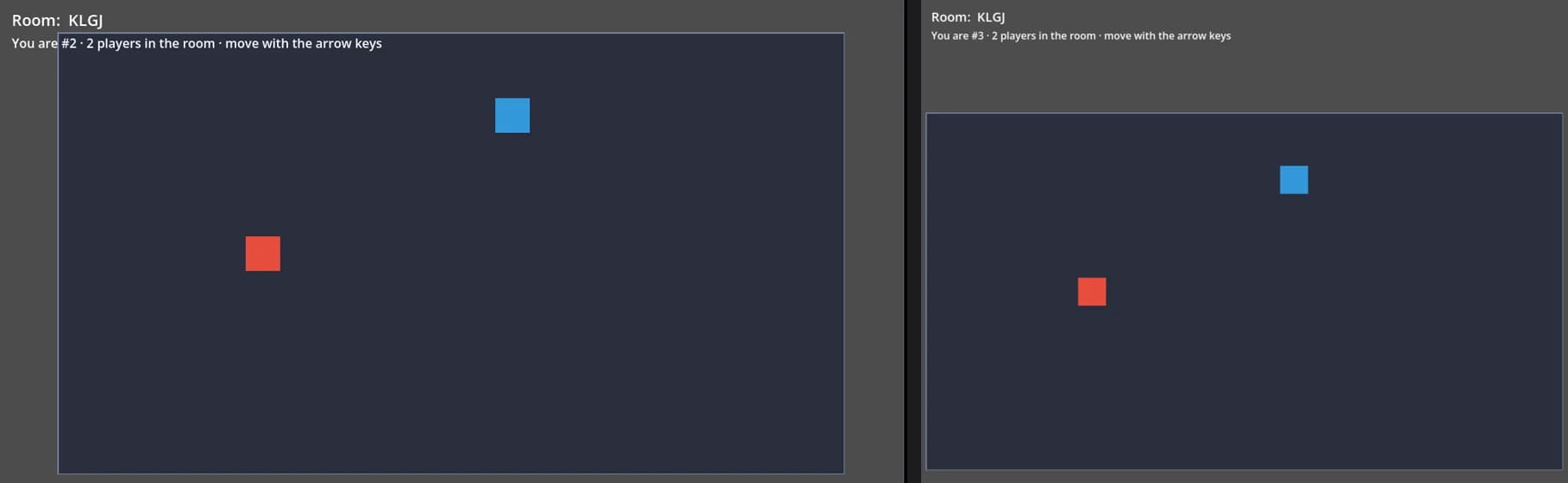
No port was forwarded and no server was running; every copy connected out to Ziva's relay. In a separate test, two headless Godot clients sending RPCs through the relay measured a round trip of 27 to 34 ms from Japan. Your numbers depend on where the room is and where your players are.
Lobbies and room codes
None of Godot's networking classes include lobbies. Steam (GodotSteam), Epic Online Services (EOSG), GD-Sync and Nakama each have their own lobby or matchmaking service. Ziva's relay has none: a room is just a name, and everyone who connects with the same name lands in the same room. A room-code screen is therefore a few lines of game code. The host makes a short random code and joins the room with that name, and the friend types the code to join the same room. Use random codes rather than words like "lobby", so strangers don't end up in your room.
Multiplayer in web exports
A browser can't open UDP sockets or accept incoming connections, so a Godot web export can't use ENet or run a WebSocket server. Godot's web exports support two kinds of networking:
WebSocketMultiplayerPeeras a client of a server or relay. When the page is served over HTTPS, as on most hosts, the server must be reachable overwss://.WebRTCMultiplayerPeer, which connects browsers to each other but needs a signaling server, and usually a STUN server, plus a TURN server for players behind strict NAT.
GodotSteam doesn't support web builds, the EOSG plugin doesn't list them, and noray relays UDP only. GD-Sync supports HTML5. Ziva's relay uses WebSocketMultiplayerPeer over wss://, so the multiplayer code Ziva writes runs in desktop and web exports alike. If you host the web build on your own site and it sends a Content Security Policy, that policy must allow wss: connections.
What Ziva's relay doesn't do
- No lobbies, matchmaking, server browser or friend invites; the game shares room codes itself.
- No dedicated or authoritative server: the relay forwards messages and never runs your game code, so it doesn't stop cheating.
- No region choice: each room runs in one Cloudflare location near whoever opened it, so players far from it see more delay. Fine for co-op, card and turn-based games; not for competitive shooters or fighting games.
- At most 32 connections per room, about 30 new connections per minute for the whole game, and about 4 MB of saved data per room with the code Ziva writes.
- Each account's relay traffic is limited to 500 GB per calendar month, with a warning email at 50 GB. Past the limit, new connections are refused until the next month; players already connected stay connected.
- Only on Pro and Ultra, and only in Godot. If the developer's subscription ends, the game stops accepting new multiplayer connections.
See Multiplayer limitations for the details.
When another tool is better
- Shipping on Steam: GodotSteam.
- Fast, competitive games: netfox, with noray or your own server.
- Server-side game logic and many players: Nakama on your own server or Heroic Cloud, or Colyseus.
- Free hosting for a small game and you write the code yourself: GD-Sync's free plan or Epic Online Services.