Game analytics for Godot
Godot game analytics, set up in one prompt
Ask Ziva to add analytics to your game. It installs a small GDScript SDK, adds tracking for the events you care about, and sends them to a live dashboard on ziva.sh. No server to build and no keys to copy.
How it works
From prompt to live dashboard
Analytics usually means choosing a service, creating a project, copying a key and wiring up an SDK. Ziva does those steps for you inside the Godot editor.
- 01
Ask Ziva
Say what you want to learn, for example: "Add analytics to my game. Track when a player collects a coin or finishes the first level."
- 02
Ziva installs the SDK
It creates an analytics project on your Ziva account, adds the ZivaAnalytics autoload and saves its settings in project.godot. Then it adds tracking calls for your events.
- 03
Play and check
Run the game, then ask Ziva to "check analytics" to confirm that events arrived. Events usually reach the dashboard in 5-15 seconds.
ZivaAnalytics.track("level_complete", {"level": 3, "time_s": 41.2})
ZivaAnalytics.identify("Bobby")
The dashboard
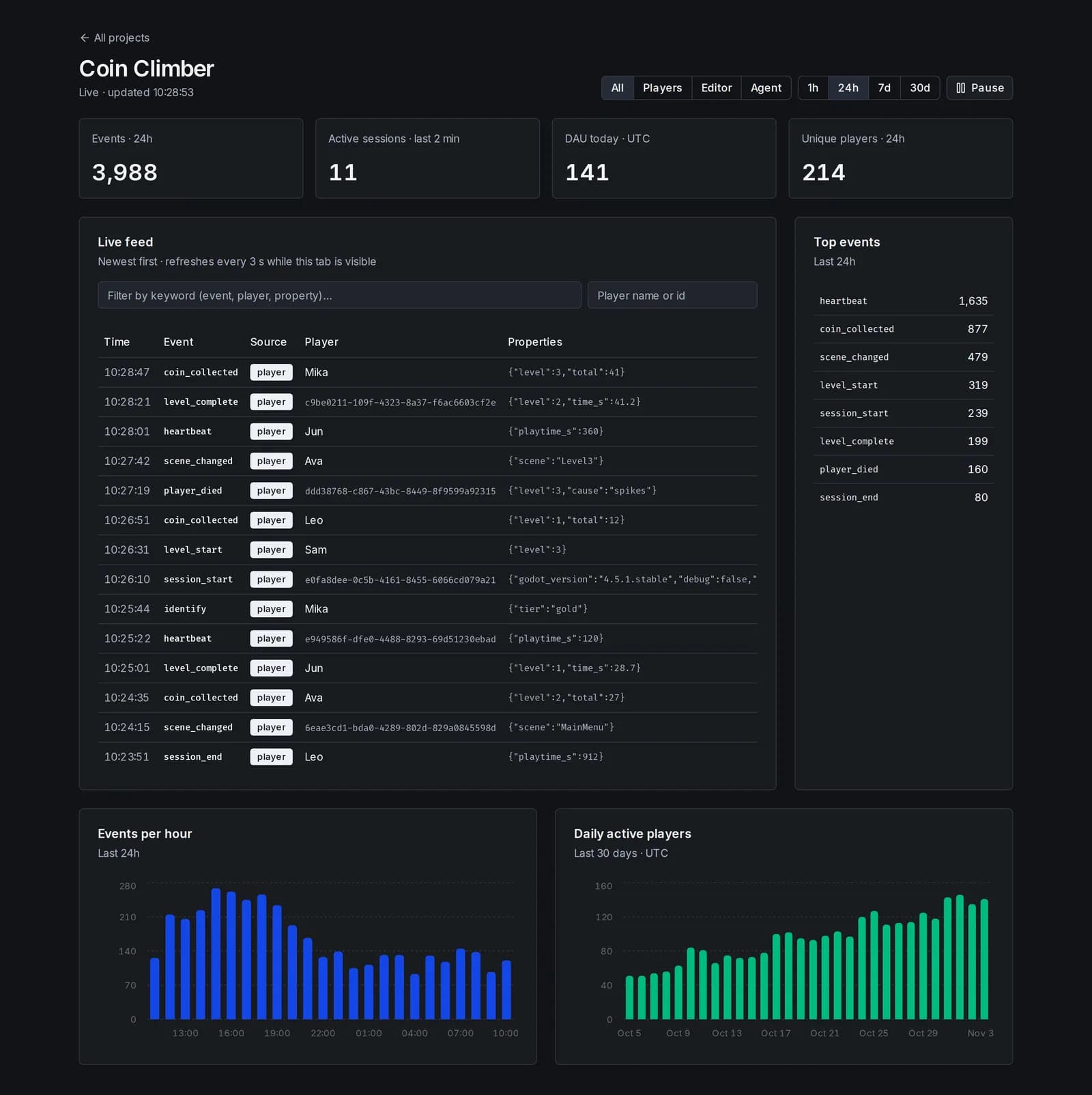
See who plays and what they do
Open it from Settings → Pro Features → Game Analytics in Ziva, or from Account → Analytics on ziva.sh.
Players right now
Active sessions in the last 2 minutes, today's daily active players and unique players for the selected time range.
Activity over time
Event counts for the last hour, 24 hours, 7 days or 30 days, plus daily active players for the last 30 days.
Top events
The most common events in the selected range, so you can compare how often each level starts and finishes.
Live feed
The latest events, refreshed every few seconds and searchable by event name, player name or event details.
Player lookup
Find a player by name or ID and follow their events. Names appear only if your game supplies them.
Leave out test runs
Filter by source to see exported builds without your own editor runs or Ziva's test runs, so testing does not skew your numbers.
Tracked automatically
Useful data before you add a single event
As soon as the SDK is installed, it records these events with no extra code:
- session_start
- When the game launches, with the Godot version and locale.
- scene_changed
- When the current scene changes, with the scene name.
- heartbeat
- Every 60 seconds, with playtime so far.
- session_end
- When the window closes, with total playtime. Best effort.
Every event also carries a session ID, a random player ID, the platform and your game version when it is set.
Analytics works in the editor, in Ziva playtests and in exported games, including web builds. The SDK sends events in the background, so it never blocks your game. If the server rejects events, analytics turns off for that session instead of stopping the game.
Compared with other tools
Less setup than a standalone analytics plugin
Dedicated analytics services offer deeper reports. Ziva Analytics is for Godot developers who want answers without building the pipeline themselves.
| Capability | Standalone analytics plugin | Ziva Analytics |
|---|---|---|
| Project and key created for you | Sign up and copy a key | One prompt |
| Tracking code written for your events | You write each call | Ask in your own words |
| Checks that events arrived | Open the dashboard and look | Ask Ziva to check analytics |
| Separates your test runs from exported builds | Varies | Editor, agent and player sources |
| Funnels, cohorts and retention reports | Often included | Live feed, daily players and top events |
| Free plan | Often available | Needs Pro |
Privacy and limits
What gets sent
- Analytics sends events, basic game details, a random player ID and any event details or player names your game supplies.
- The SDK does not read hardware identifiers, IP geolocation or file paths. Do not include personal data unless your game's privacy policy covers it.
- The key saved in your project can only add events to your project. It cannot read anything, so it is safe to ship in exports.
- Raw events are kept for 90 days.